WordPressに関する情報や技術紹介です

Easily embed GoogleMap into WordPress

Care, etc. will display the location of the company GoogleMaps .

This is difficult to assign and begs and · to get the API.
Is now the world has become very useful because it is pasting the article that appears in the copy and paste the code directly.

The actual procedure is as follows.

  1. GoogleMaps to navigate to the location you want to display from the
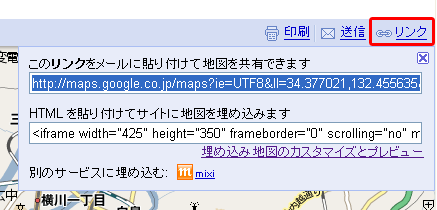
  2. To copy the text box below and click the "Link" in the upper right corner of the map, "to embed the map to the site and paste the HTML"
    Google Maps
  3. Paste where you want to display in the article

※ You can change the size in the "Customize and preview embedded map".

I've embedded it actually is less than or equal to.

View Larger Map

Tag
, ,
Trackback URL

Leave a Reply

Your email address will not be published. * Fields are marked required

*

You can use these HTML tags and attributes: <a href="" title=""> <abbr title=""> <acronym title=""> <b> <blockquote cite=""> <cite> <code> <del datetime=""> <em> <i> <q cite=""> <strike> <strong>

ページTOPに戻る